The Office of the Provost is requesting that you complete and submit this form if you intend to apply for sabbatical. Completing this form is not a substitute for your unit-level processes, and your submission neither prohibits nor precludes your application. If you are uncertain about applying for sabbatical in an upcoming academic year, go ahead and submit this form.

Interfolio Sabbatical Resources for Candidates
Candidates include those faculty and SPS being considered for sabbatical.
If you would like to confirm your eligibility for sabbatical, including if you are considering applying in an upcoming academic year, please complete and submit this form. Completing this form is not a substitute for your unit-level processes, and your submission neither prohibits nor precludes your application. If you are uncertain about applying for sabbatical in an upcoming academic year, go ahead and submit this form. Thank you!
Candidate Self-paced Training
This self-paced, interactive course provides a step-by-step guide for preparing and submitting your materials for an upcoming review.
Estimated time to complete: 30 minutes
Candidate Frequently Asked Questions
Faculty can log in via the Interfolio portal by searching for Northern Illinois University and then entering their institutional credentials (NIU Account ID and password) when prompted. They can also login directly here with NIU credentials.
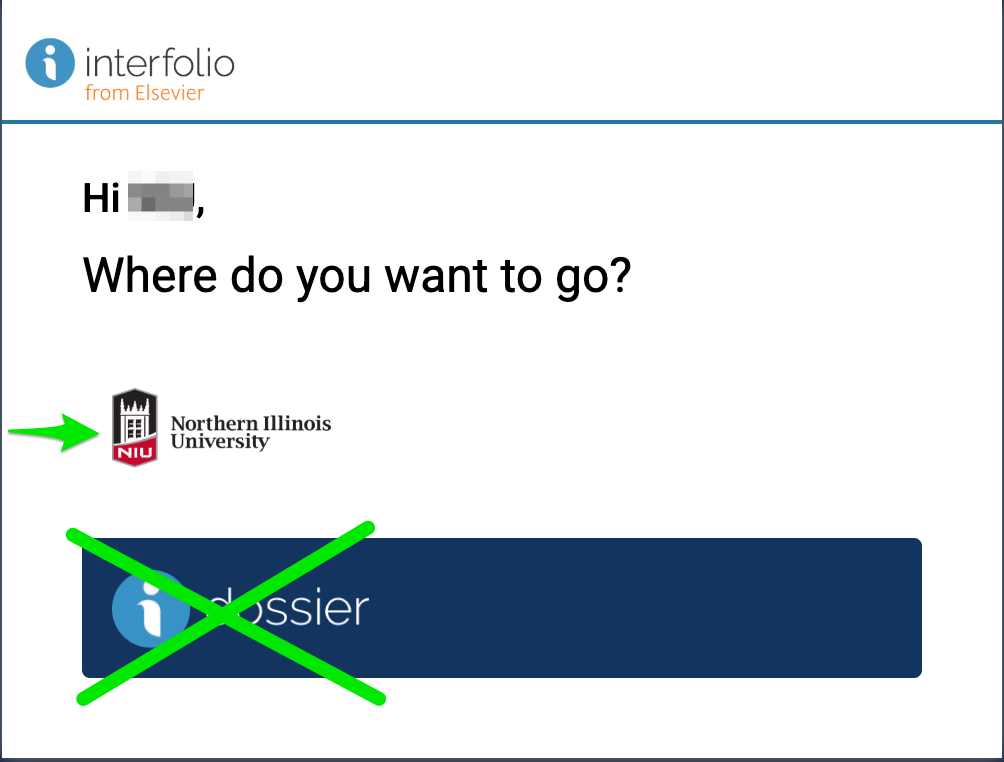
On the "Where do you want to go"? screen, two options appear (see screenshot just below). Click the NIU logo to access NIU's Interfolio system. Do NOT click the Interfolio dossier logo; this sends you to a part of Interfolio that NIU does not use.
You will receive an email notification when your case is created. Log in to Interfolio, review the required documents and forms, upload your materials and submit by the deadline.
Yes, find details about the sabbatical packet template here.
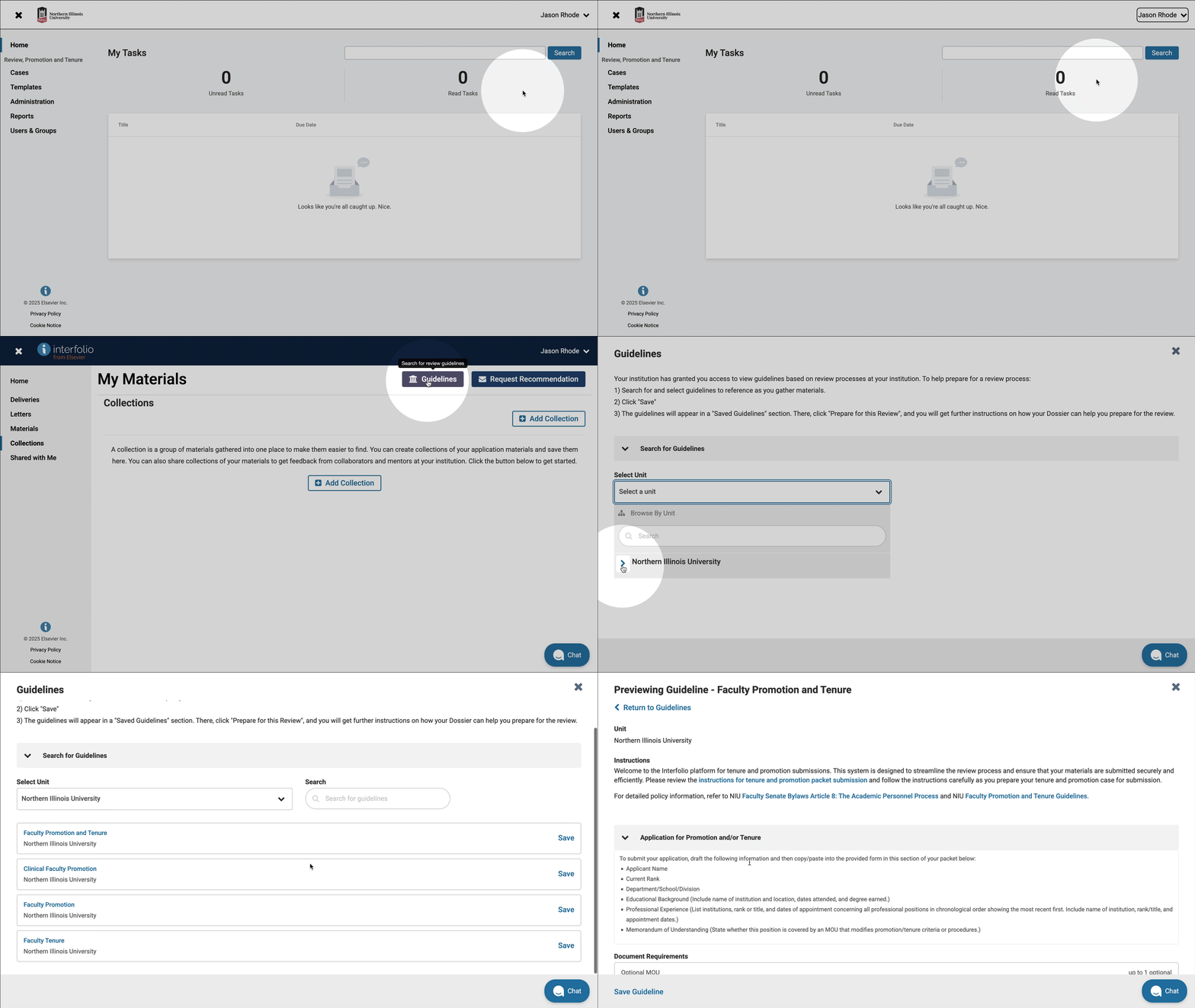
You can not only find an introduction to NIU sabbatical template, but after you login to Interfolio with your NIU username and password you can navigate to a preview of the various packet templates in the system.
- Click the arrow beside your name in the upper right corner and then click Interfolio Dossier
- Click Collections
- Click Guidelines
- Under Search for Guidelines, click Select a unit and then Northern Illinois University
Interfolio supports a variety of file types, including PDFs, Word documents and images. File size limits may apply.
Once you submit your packet, edits are typically restricted. If you need to make changes, contact your case manager to discuss options.
You can track your case status within Interfolio RPT. You will also receive notifications as your case moves through the review process.
Access is restricted to authorized committee members and administrators at each stage of review. Interfolio ensures confidentiality and data security.
Yes, there is a storage limit for candidate packets. Each packet has a limit of 5GB. This means that all materials uploaded by the candidate must fit within this size restriction.
Have more questions?
Email interfolio@niu.edu and a member of our Interfolio at NIU team will be back in touch as soon as possible!
Note: You must log in using your NIU Account ID and password.
Get Help
Interfolio Scholar Services
For technical issues with Interfolio, Interfolio Scholar Services provides live support by phone or email Monday through Friday, 8:00 a.m.– 7:00 p.m. CT.
833-844-2118
interfolio-support@elsevier.com
Interfolio at NIU
For questions about NIU polices and procedures related to the preparation and review of promotion and tenure or sabbatical materials, please contact leadership at your department / school, college, or the Office of the Provost. Questions best addressed by the Office of the Provost can be directed to interfolio@niu.edu.