Interfolio RPT is an online platform that streamlines faculty review processes, including promotion, tenure and annual reviews. It allows candidates to submit materials, committees to review cases and administrators to manage workflows efficiently.
Interfolio Frequently Asked Questions
About Interfolio
NIU is adopting Interfolio RPT to improve efficiency, transparency and consistency in faculty review processes. By replacing paper-based workflows, the system provides a secure, centralized platform that aligns with the university’s changes to promotion and tenure bylaws. Interfolio RPT streamlines the review process, reducing administrative burden and improving data security. It also simplifies the management of external reviews, ensuring a seamless and modernized approach. NIU joins a growing number of 500+ institutions that use Interfolio RPT to support fair, clear, and efficient faculty evaluations.
No, requirements are not changing for promotion and tenure consideration at NIU. You are only required to submit the materials outlined in your department or school bylaws and follow the usual submission timeline established by your department.
We are simply updating the medium for doing so through Interfolio to streamline workflows while enhancing security, ensuring compliance with evolving guidelines and reducing administrative burden. The goal is for our faculty and staff to be able to focus more on their teaching, research and service.
Faculty, committee members and administrators can log in via the Interfolio portal by searching for Northern Illinois University and then entering their institutional credentials (NIU Account ID and password) when prompted. They can also login directly here with NIU credentials.
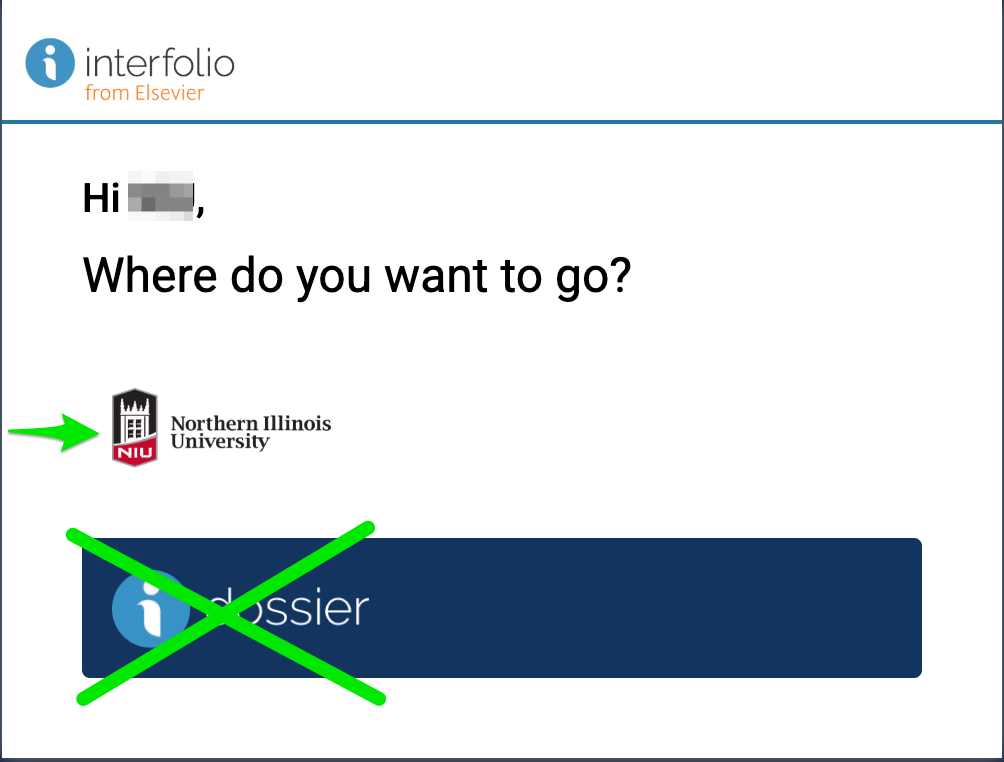
On the "Where do you want to go"? screen, two options appear (see screenshot just below). Click the NIU logo to access NIU's Interfolio system. Do NOT click the Interfolio dossier logo; this sends you to a part of Interfolio that NIU does not use.
Currently, on-demand training resources are available, including Interfolio’s help guides and interactive training courses.
Live NIU-specific Interfolio training is being scheduled for those who will be using the system during the 2026-2027 cycle. Find more details here.
You can access Interfolio’s support resources, including user guides and interactive training courses, curated on the Interfolio at NIU support website and through the Interfolio Product Help Center. These materials cover key functions for faculty, committee members and administrators.
Yes, NIU-specific training sessions and documentation will be introduced later this year to align with institutional processes. The first of these sessions, for case managers and faculty candidates, are being scheduled. See available training details to learn more and stay up-to-date.
Please contact leadership at your department/school, college, or the Provost's Office. For any questions best addressed by the Provost's Office email interfolio@niu.edu.
Interfolio Scholar Services is available for live support Monday through Friday between 8:00 a.m.– 7:00 p.m. CT. Support is available by phone at 833-844-2118 or email interfolio-support@elsevier.com.
Privacy and Security
NIU's use of Interfolio focuses on a module called "Review, Promotion and Tenure" which Interfolio refers to as "RPT" for short. Interfolio's Dossier platform is also included with NIU's license. The university’s focus is on using RPT for faculty promotion, tenure, and related review processes. Although faculty may use Dossier individually for their own purposes, the university is not using or supporting Dossier.
No, faculty do not have to use the Interfolio Dossier product.
If you have questions about Interfolio Dossier, you should email the Interfolio Scholar Services Team (interfolio-support@elsevier.com).
If you accidentally uploaded your promotion and tenure files into Interfolio Dossier, you should email the Interfolio Scholar Services Team (interfolio-support@elsevier.com) and cc the NIU Interfolio team (interfolio@niu.edu).
NIU template letters instruct external evaluators to keep faculty promotion and tenure materials confidential. After accepting the invitation, the external reviewer is provided a secure link with restricted access only to certain materials for the candidate they are reviewing. They do not have access to the NIU Interfolio system itself. Of the faculty member's promotion and tenure materials, the external reviewers have restricted and temporary access only to those promotion and tenure materials that the faculty member indicated should be provided to external reviewers.
All materials that faculty upload to the faculty promotion and tenure system, which Interfolio calls RPT (Review, Promotion and Tenure), are treated as confidential.
Internally, NIU controls access permissions via case managers (typically a college administrative staff person) and provost office staff. These case managers and provost office staff have access throughout the full review process. Once the faculty member indicates that the package is complete, routing follows existing department, college, and university personnel policies and procedures. A common routing defined by departmental and college personnel policies and procedures is first routing to the departmental personnel committee and department chair and second routing to the college council and dean. Based on university policies and procedures, the materials would then route to the Faculty Senate Personnel Committee and provost, and then to the president. Once the portfolio is forwarded to the next level (department, college, university), prior levels no longer have access. Once the case is closed, access will be limited to the provost office.
Interfolio's customer support team has access to materials that faculty upload into the RPT system. Interfolio also contracts with some third-party companies to assist in providing Interfolio service. These third-party contractors also have access to materials. Their access to the materials is solely for purposes of delivering the RPT service to NIU.
Logging into NIU's platform within the Interfolio system uses NIU single sign on, carrying over NIU's security protocols including two factor authentication.
You can send an email to interfolio@niu.edu and one of NIU’s Interfolio team members will respond.
Faculty Candidates
No, all current deadlines and existing departmental requirements remain exactly the same. You still follow your usual departmental timeline for submission. Each department, as it has always been, establishes their own deadlines.
No. You are only required to submit the materials outlined in your department or school bylaws and follow the usual submission timeline established by your department.
The Office of the Provost is requesting that you submit this form if you intend to seek promotion and/or tenure for the 2026-2027 academic year.
We will communicate this initial intent with case managers in your college to assist in their preparations. However, completing this form is not a substitute for your unit-level processes, and your submission neither prohibits nor precludes your 2026-2027 application. If you are uncertain about applying for promotion and tenure in 2026-2027, go ahead and submit this form.
Your submitted notification helps ensure that the Office of the Provost includes you in all targeted communications and support as you prepare your application. In addition, it will help to prioritize college-level specification of the application templates in Interfolio for the upcoming 2026-2027 year. General information about Interfolio at NIU is available here.
If you are not seeking promotion and/or tenure in this cycle, no action is required. Please refer to your department or school bylaws for the usual submission timeline and specified criteria.
You will receive an email notification when your case is created. Log in to Interfolio, review the required documents and forms, upload your materials and submit by the deadline.
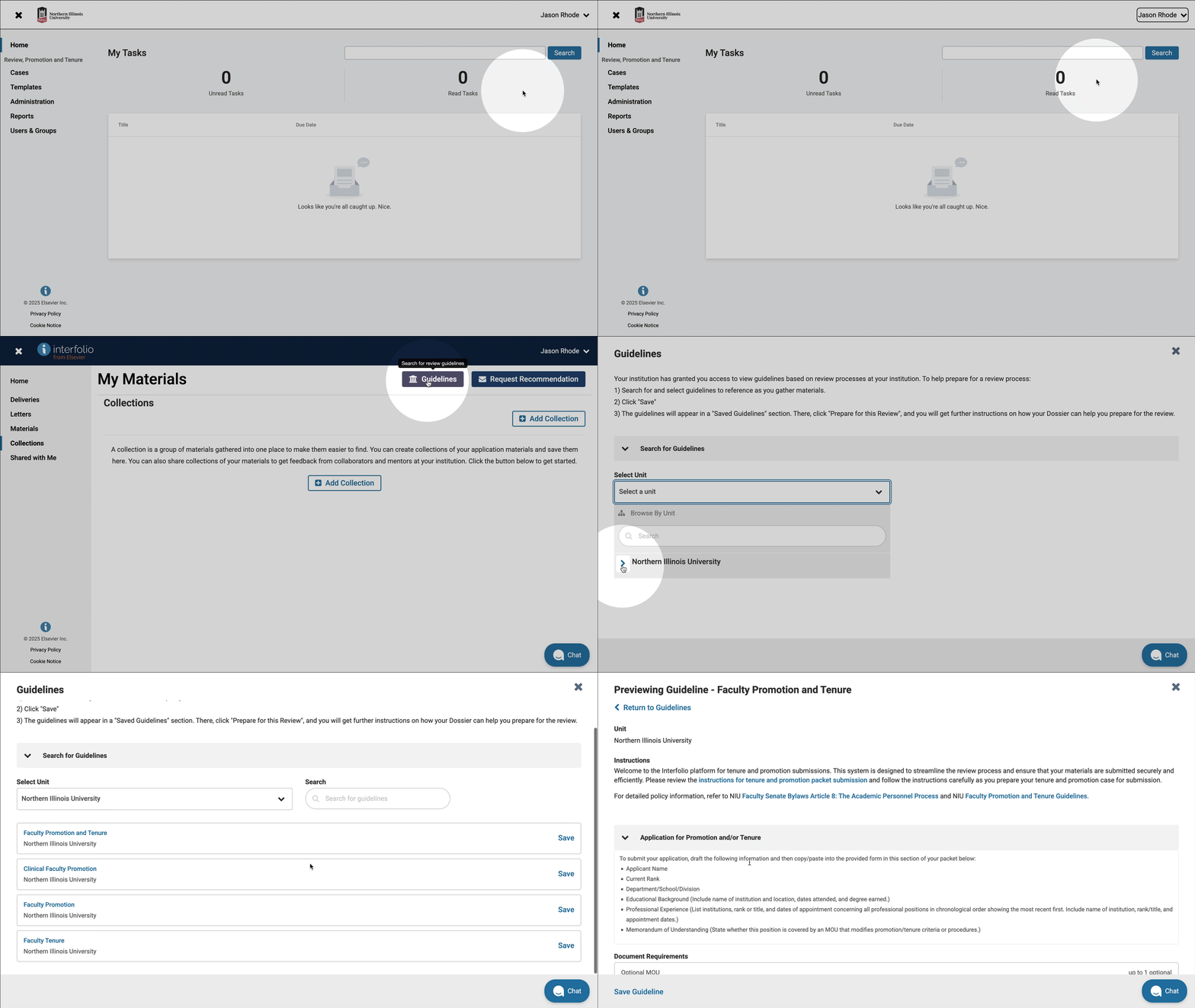
You can not only find an introduction to NIU faculty promotion and tenure packet templates, but after you login to Interfolio with your NIU username and password you can navigate to a preview of the various packet templates in the system.
- Click the arrow beside your name in the upper right corner and then click Interfolio Dossier
- Click Collections
- Click Guidelines
- Under Search for Guidelines, click Select a unit and then Northern Illinois University
Interfolio supports a variety of file types, including PDFs, Word documents and images. File size limits may apply.
Once you submit your packet, edits are typically restricted. If you need to make changes, contact your college case manager to discuss options.
You can track your case status within Interfolio RPT. You will also receive notifications as your case moves through the review process.
Access is restricted to authorized committee members and administrators at each stage of review. Interfolio ensures confidentiality and data security.
Faculty candidates submitting their promotion and tenure packet in Interfolio RPT should upload the documents intended for external reviewers to the section labeled "Materials to Share with External Evaluators." This section is specifically designated for materials that will be shared with external reviewers as part of the review process.
To upload your documents:
- Log in to Interfolio RPT.
- Navigate to your Promotion and Tenure case under "Your Packets."
- Locate the section titled "Materials to Share with External Evaluators."
- Click "Add File" to upload the appropriate materials.
If you have questions about what to include, please contact your department chair for guidance.
Yes. If your external review materials are due before your full promotion and tenure packet is complete, you may provide a current version of your CV for external reviewers and continue updating your dossier materials for later review stages. Please note that the CV for external reviewers must be directly uploaded in the Materials for External Evaluators section even if you have already uploaded it to the CV section of Interfolio.
The CV in the "Curriculum Vitae" section and a CV in the "Materials for External Evaluators" section are not synced together in the system in any way. If candidates would like external evaluators to see their CV they should upload a copy of their CV into the "Materials for External Evaluators" section. This copy of the CV can be the same as the CV they upload to the "Curriculum Vitae" section or different. This flexibility allows candidates to, for instance, upload an abbreviated CV for external reviewers, or to upload a version of the CV for external reviewers before they finalize a CV for department, college, and university review, if doing so is recommended by their department or college.
If you upload a CV for external reviewers and later need to make updates you may upload an updated or finalized CV in the designated CV section when preparing your full dossier.
Not necessarily. External review materials are often prepared earlier than the final promotion and tenure packet. As a result, the CV provided to external reviewers may reflect the candidate's accomplishments at the time external reviews are requested, while the final packet may include additional publications, presentations, grants or other achievements completed before the packet deadline.
You should upload any materials that will be shared with external reviewers, such as:
- Current CV
- Selected publications, creative works or scholarly products
- Other materials requested by the department, college, or chair
Consult your department, college guidelines and chair for specific expectations regarding the number and type of materials to be shared.
Yes. If a document is intended to be shared with external reviewers, it should be uploaded to the "Materials for External Evaluators" section even if the same document will later appear elsewhere in the dossier.
External reviewers typically need sufficient time to review materials and prepare their evaluation letters before formal promotion and tenure review begins. Collecting external review materials earlier allows departments to initiate the review process while candidates continue preparing the remainder of their packet.
Yes, there is a storage limit for candidate packets. Each packet has a limit of 5GB. This means that all materials uploaded by the candidate must fit within this size restriction.
Committee Members
Log in to Interfolio, navigate to the Cases tab, and select the assigned case. You can view submitted materials, evaluation criteria and submit recommendations.
While you cannot annotate directly on submitted documents, you can add private notes (visible only to you) for committee discussions when viewing within the Interfolio document reader.
Yes, case downloads are enabled at NIU. Downloads are permitted for the entire packet, meaning all materials—excluding videos and web links—can be downloaded either as a ZIP file or a PDF. Committee members can also download individual documents or all documents together directly from the document reader. Learn more here: Download Case Materials.
Yes, faculty review policies and criteria remain the same. Interfolio simply facilitates digital access to materials. Reviewers should follow NIU’s established evaluation procedures.
Access will be restricted once your committee’s review stage is complete. Check with the case manager if you need to reference materials later.
Committee Managers (Department Chairs and Review Coordinators)
You oversee case setup, ensure reviewers have access, manage deadlines and facilitate the review process. You may also communicate with candidates and committees.
Within Interfolio, you can designate committee members and adjust access permissions as needed. Work with your college case manager to ensure the correct reviewers are assigned to your case(s).
You can download individual case documents or all documents together directly from the document reader. Learn more here: Download Case Materials.
Yes, Interfolio allows you to send automated or manual reminders to reviewers about upcoming deadlines.
First, verify their role permissions in Interfolio. If issues persist, email interfolio@niu.edu for assistance.
This usually happens if the incorrect case template was used when setting up the candidate’s case in Interfolio. Committee forms are tied to the case template, which determines whether the options for promotion, tenure, or both appear.
If you notice a mismatch, please check with your college case manager to confirm that the correct case template was applied. If it was not, the case manager can update the case forms to ensure the appropriate options are available for recording committee recommendations and vote tallies (whether for promotion, tenure, or both).
Case Managers (College/University-Level Administrators)
Case managers set up cases by selecting a workflow template, adding candidate information and ensuring the correct review steps and documents are included.
Yes, Interfolio allows customization of workflows to align with NIU’s specific review processes.
Workflows are designed to follow NIU’s official policies. Case managers should verify setup details before launching cases to ensure alignment.
Once a review is finalized, cases are archived in Interfolio for record-keeping. Access can be granted to appropriate personnel as needed.
If you realize that the wrong case template was used when creating a candidate’s case, do not attempt to correct it on your own. Please email interfolio@niu.edu for assistance from the NIU Interfolio team. They will help ensure that the correct forms and settings are applied so the case is properly configured.
To avoid delays in the review process, we recommend reaching out as early as possible if you suspect a template error.
External Review
External reviews should be requested once the faculty candidate has submitted at minimum the CV and materials that they wish to share with external reviewers. Contact your college case manager if you are unsure whether the case is ready.
Be sure to initiate invitations early enough that reviewers have adequate time to respond before your department’s internal deadline. We recommend aligning your requested response date with your departmental timeline established in your bylaws.
There are several common reasons why you might not see your faculty candidate(s) cases when you log in to Interfolio. It may be that the faculty candidate hasn't finished and submitted uploading their CV and materials to share with external evaluators. Or, your college Interfolio case manager may not have yet finished configuring access to the review steps in the case to grant you chair access.
If you don't see a faclty candidate case as expected in Interfolio, contact your college Interfolio case manager.
When you send an invitation through Interfolio, the external evaluator receives an email with a secure, unique link. After accepting the invitation, they can view and download only the materials you designated for sharing—they do not have access to the candidate’s full packet or to any other part of NIU’s Interfolio system. Their access is both restricted and temporary.
When the invited external reviewer clicks the "View Request" link in the email they receive from Interfolio, they see in their web browser a page where they officially accept or decline serving as a reviewer.
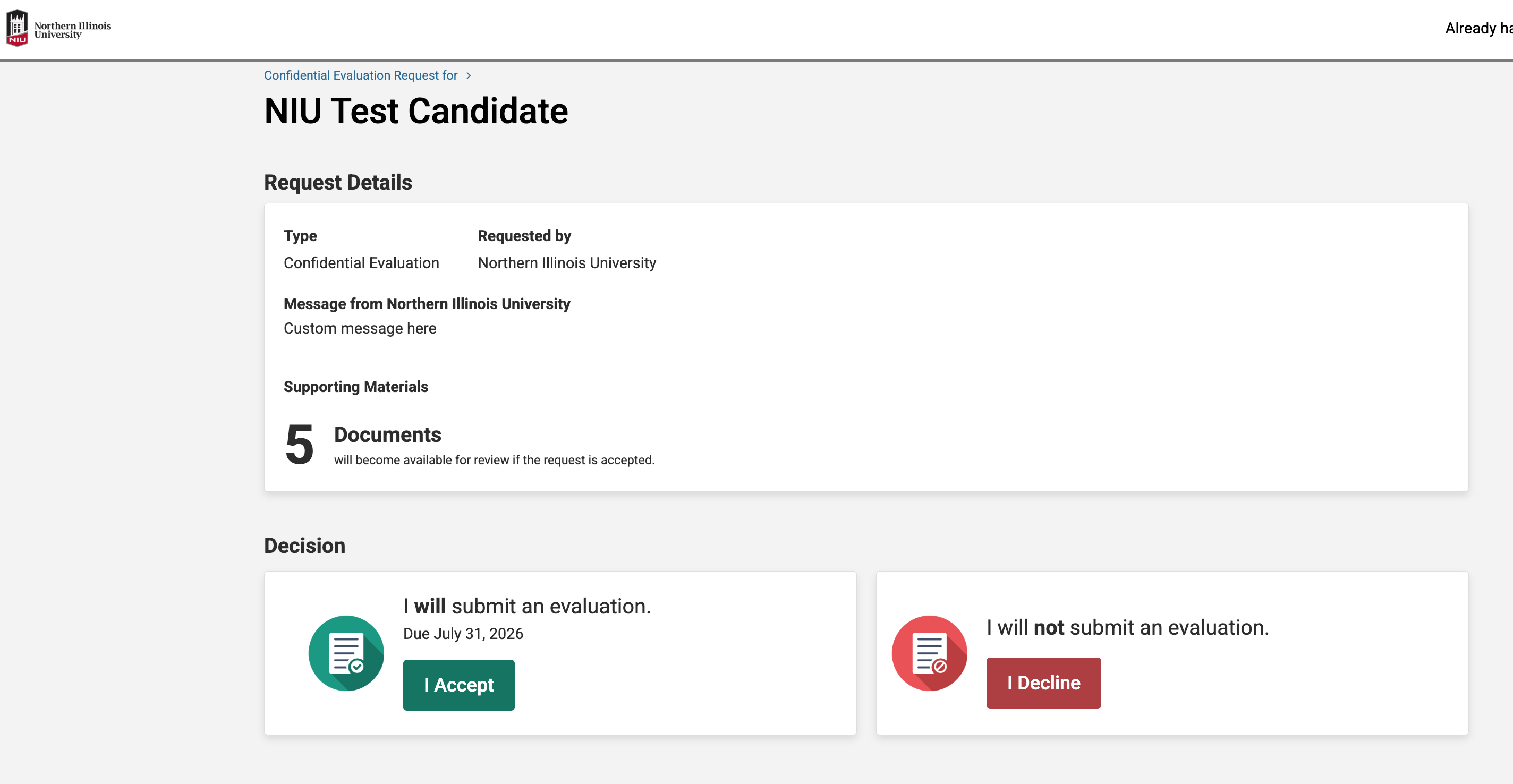
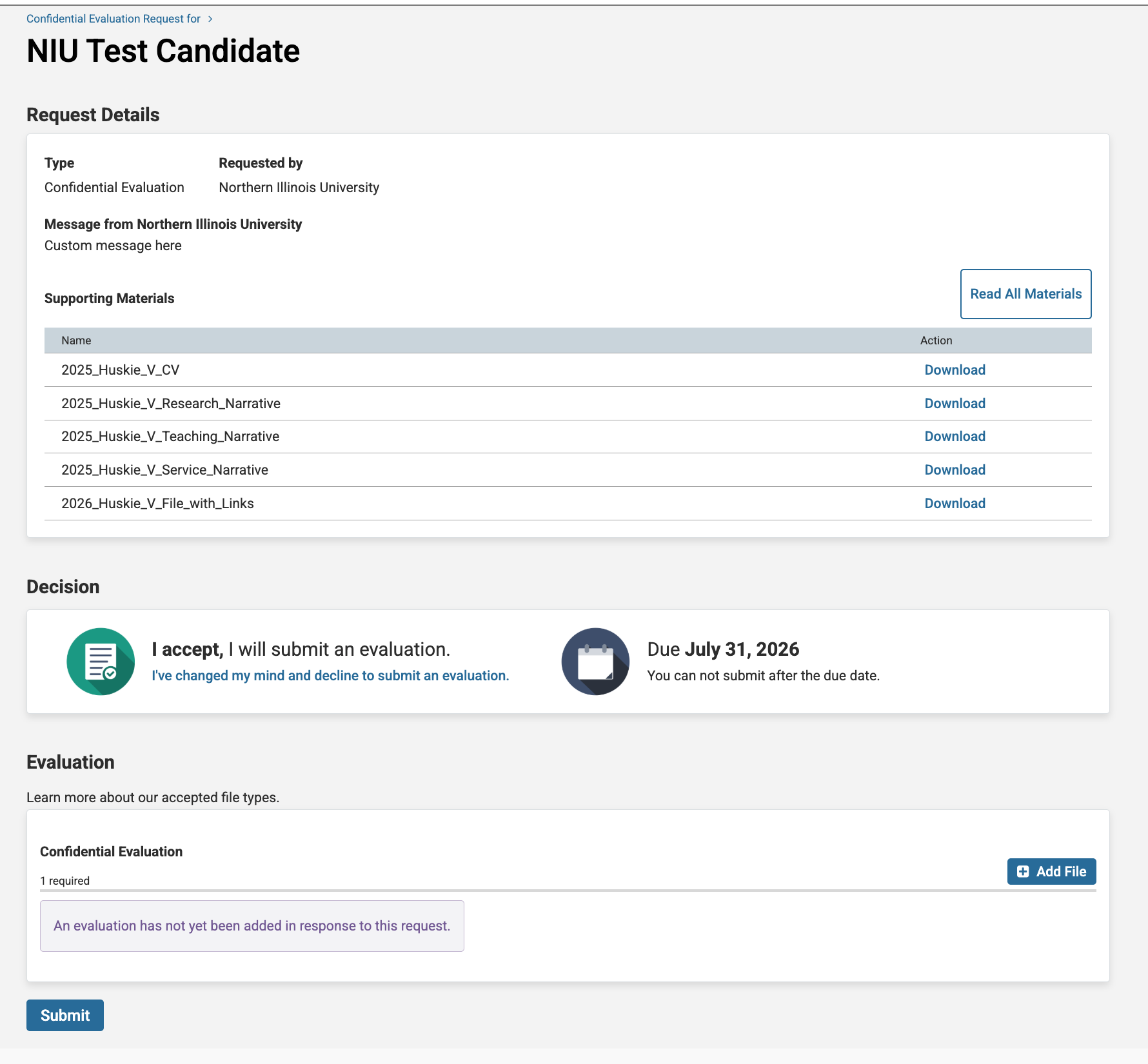
When they click the "I Accept" button, the page then updates to include links to the documents shared from the candidate packet as well as the link for the reviewer to upload and submit their review letter.
If an evaluator declines, their status in the External Evaluations section will update to “Declined.” You can then add a replacement evaluator using the same process. There is no limit to the number of invitations you can send. Consult your department bylaws for guidance on the minimum number of external evaluations required and whether declined invitations affect that count.
Yes. You can add new evaluators at any time by returning to the External Evaluations section and clicking “Add Evaluator.” If you need to withdraw an invitation that has already been sent, contact your college case manager or email interfolio@niu.edu for assistance.
Yes. Within the External Evaluations section, you can send a reminder email directly from Interfolio to any evaluator whose status is still “Invited” or “Accepted” and who has not yet submitted their letter. Interfolio also allows you to set automatic reminders before the response deadline.
Evaluators only see the materials from the candidate’s packet that are specifically designated for external review. These are documents the candidate uploaded to the section labeled “Materials to Share with External Evaluators.” As the department chair initiating the request, you will confirm and select which of those documents to include when setting up each invitation. If the candidate has not yet uploaded materials to that section, ask them or the case manager to do so before you send invitations.
Interfolio does not automatically notify candidates when external review invitations are sent. Follow the notification practices outlined in your department or school bylaws. Some bylaws require that candidates be informed of the names and affiliations of external evaluators prior to invitations being sent; others do not. Consult your bylaws and the Office of the Provost if you are unsure of your department’s requirements.
Have more questions?
Email interfolio@niu.edu and a member of our Interfolio at NIU team will be back in touch as soon as possible!
Note: You must log in using your NIU Account ID and password.
Get Help
Interfolio Scholar Services
For technical issues with Interfolio, Interfolio Scholar Services provides live support by phone or email Monday through Friday, 8:00 a.m.– 7:00 p.m. CT.
833-844-2118
interfolio-support@elsevier.com
Interfolio at NIU
For questions about NIU polices and procedures related to the preparation and review of promotion and tenure or sabbatical materials, please contact leadership at your department / school, college, or the Office of the Provost. Questions best addressed by the Office of the Provost can be directed to interfolio@niu.edu.