Assessment due dates will show up on the Blackboard course calendar automatically if you include them in the assessment set up. When creating a new assignment or test just include a due date and time, and you and your students will be able to see it on their calendars. Use the Date Management tool to change the due dates each semester.
Calendar
You can use the Course Calendar to provide students with dates for course-related events. Course Calendar events appear to all members of the course. For a quick overview of your current week, go to the Blackboard overview page in My Blackboard.
Common entries you may include in the Course Calendar are:
- Class meetings
- Office Hours
- Due Dates
- Exam dates
- Guest lectures
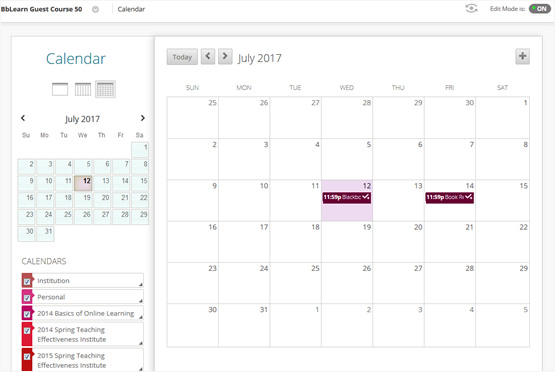
Calendar events are color coded to indicate which place/entity they are associated with. Easily add calendar events by clicking on a date and adding an event. Class assessments with due dates automatically appear on the calendar. Faculty can move calendar events by dragging and dropping them to a new date. Users can click on calendar events to take them directly to an associated item. The Calendar honors adaptive release and availability rules. Calendar apps can subscribe to events created on the Blackboard Learn calendar through an iCal feed. When reusing content through Course Copy, archive/restore or import/export, the course calendar events are propagated to the new course.
Getting Started with Blackboard Global Calendar
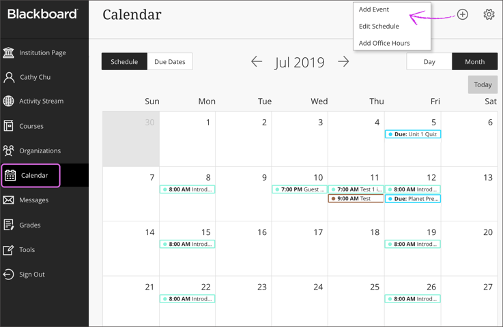
The Blackboard global calendar can be found in the Blackboard Ultra Base Navigation. The global calendar displays events and dates from multiple courses in one location. All due dates and meetings instructors create in their courses appear automatically on the calendar. To access the calendar within a course, click on the calendar icon at the top of the course in Ultra Course View or in Tools in the left-hand navigation of Original Course View. When you access the calendar from within the course, you will only see events from that course. The course view of the calendar displays due dates, the course schedule, office hours and other course-specific meetings and event. When an instructor creates content with a due date, it will automatically be added to the calendar.
Time and Task Management
Students can manage their time by keeping track of due dates, course schedules, and synchronous class meeting times using the Blackboard course or global Calendar. Instructors must add due dates to content, such as assignments, for the dates to appear on the course calendar or students can manually add due dates and schedules to their own calendars. Instructors, teaching assistants and students can select the Calendar Setting icon to select which course calendars they want to view. Users may also have Personal Calendars in which they can add unique events such as study sessions or their work schedule.
- Create an Event
- Edit or Delete an Event
- Check your Course Calendar
- Share your Blackboard calendar with Outlook or other calendars
- Add an external calendar to your Blackboard calendar
Frequently Asked Questions
Yes, use the Date Management tool. You can use the date management tool to update content dates when you copy or restore a course from a previous term or calendar year. Date types include due dates, availability, and adaptive release dates related to the course content.
Yes, you can manually add dates to the Blackboard course calendar. You can create, edit or delete one event or repeating events.
- Select the plus (+) button or select a specific date on the calendar
- Type the New Event Name
- Choose a calendar to associate the event with, such as a course calendar or your personal calendar.
- Select start and end times
- Type the Event Description
- Select Save
Yes, you can manually add dates to the Blackboard personal calendar. You can create, edit or delete one event or repeating events.
- Select the plus (+) button or select a specific date on the calendar
- Type the New Event Name
- Choose a calendar to associate the event with, such as a course calendar or your personal calendar.
- Select start and end times
- Type the Event Description
- Select Save
Yes, your students can manually add dates to their Blackboard personal calendar. They can create, edit or delete one event or repeating events. Students can start by opening up your syllabus to prepare to add the events their calendar.
- Select the plus (+) button or select a specific date on the calendar
- Type the New Event Name
- Choose a calendar to associate the event with, such as a course calendar or your personal calendar.
- Select start and end times
- Type the Event Description
- Select Save
Blackboard calendars can be exported to other calendars, such as your Microsoft Outlook calendar you use for productivity. Your schedule is a mix of academic and personal commitments. To help keep up with everything you've got going on, it helps to put everything on one calendar.
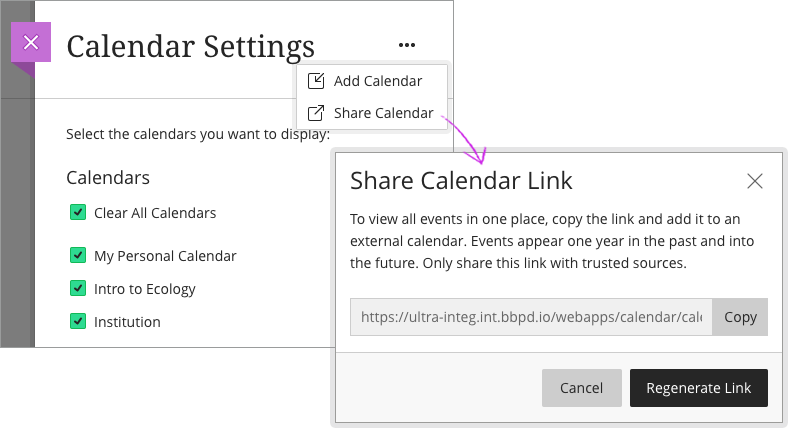
You can share your Blackboard calendar with external services, like Outlook so course events appear with other events.
- Select Calendar in the menu where your name appears first
- Select the Calendar Settings icon
- Open the menu next to Calendar Settings heading
- Select Share Calendar
- In the window, copy the calendar link. Share the URL only with trusted sources.
- In Outlook, at the bottom of the page, select the calendar icon.
- In the navigation pane, select Add calendar
- Select Upload from file
- Select Browse, choose the .ics file you copied from the Blackboard calendar share and select open.
- Select the calendar that you want the file imported to and then select Import
When you connect your Blackboard calendar to an external calendar, all course events appear one year in the past and into the future.
Learn More
Tutorials
Quick Guides
See Also...
- Students: Using the Calendar Original
- Students: Using the Calendar Ultra
Get Help
Technical Support and Student Help
Division of IT Service Desk815-753-8100
servicedesk@niu.edu